 Written by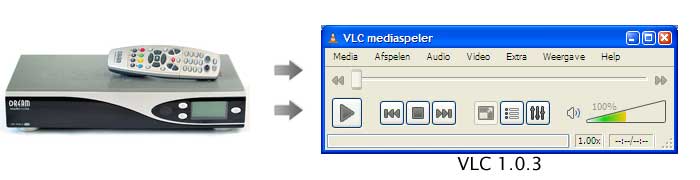
This ultra-small tutorial explains how to watch dreambox satellite TV on your PC using the latest version of VLC. If you have problems getting it to work try the comments section, maybe I can help.
Setup:
- Firefox 3.5.7
- VLC 1.0.3
- Dreambox 7000s / Enigma 1 / PLI JADE 2 (other setups not tested)
Parameters in my setup (will be different in yours!):
- Dreambox IP : 192.168.1.200
- VLC language = dutch
Note: When installing VLC , by default the “mozilla plugin†isn’t installed. You need that plugin to watch Web-X-TV. Check the box “mozilla plugin†while installing VLC.
STEP 1: NETWORK STREAM
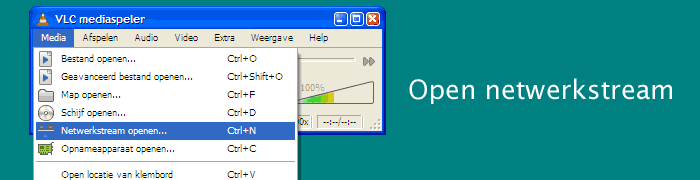
Open a network stream ( Media – open network stream )
STEP 2: OPEN HTTP STREAM
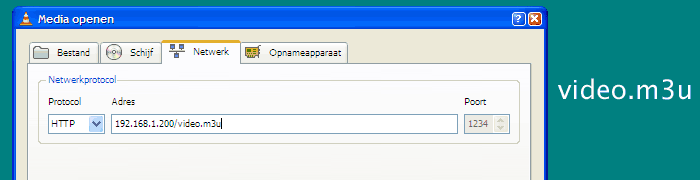
The stream is accessible via HTTP. Select HTTP for protocol. Then enter the dreambox IP address. ( 192.168.1.200 in my setup ) and add /video.m3u to the address. The complete address should look like this: 192.168.1.200/video.m3u
Now click on PLAY.
STEP 3: VIDEO
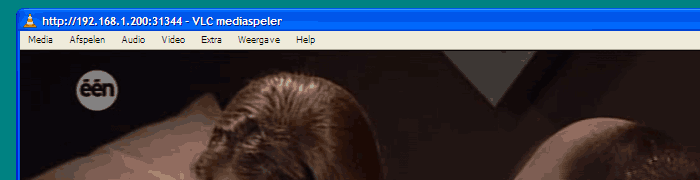
VLC player should start playing whatever TV program that is currently playing on the dreambox.
NOTE: Change video.m3u to audio.pls to listen to the audio only.
TIP: Use the webinterface to change programs.
Thanks for information is what appears to have been working hard and wanted the rest of the configuration can be done with someone your information in a sticky to me theres more than me fighting with vlc.Played a file was a bit choppy shows can ensure that a little better.
pleez dm800 pvr sating on vlc plyar
I’ve done these settings but it’s not working for me. I did exactly like you did and when I press so it starts streaming, the window just displays the VLC cone with the ip address on the bottom.
Any help with this?
Thanks for the info. It was easy to apply and worked straight away, however, as soon as I change channel in the web interface the stream locks up and I have to redo the steps 1 to 3.
Am I doing something wrong? Isn’t there a way to change channel without having to mess with VLC again?
No you are not doing anything wrong, it’s by design that the dreambox initiates a new stream when changing channels.
Try using the web-interface of the dreambox itself. Some firmware images provide a VLC plugin in the browser. This plugin keeps running when switching the channels. ( but it sometimes crashes ).
hello I am trying to stream my dreambox to my pc but the vlc player keeps telling me :
Your input can’t be opened:
VLC is unable to open the MRL ‘http://192.168.1.200/videom3u’. Check the log for details.
Hi,
Is it possible to watch StarTrack SRT 2015 HD Plus TV on PC using VLC?
Regards.
Thanks! Worked like a charm!